

Image Alt Text Auto Generator KDR Plugin 🎀
User Documentation:📜
Image Alt Text Auto Generator KDR automatically generates meaningful ALT text for WordPress images based on their filenames. Automatically generate missing image alt text from filenames and bulk update media library.
📑 Table of Contents
1. Introduction 🎗️
Image Alt Text Auto Generator KDR automatically generates meaningful ALT text for WordPress images based on their filenames.
It helps improve:
- SEO accessibility
- Image search indexing
- Screen reader support
- Content quality
- Media library optimization
The plugin works in two modes:
- Automatic mode — generates ALT text when images are uploaded
- Bulk mode — generates ALT text for existing images
2. Requirements & Compatibility 📌
- Minimum requirements:
| WordPress 5.8 or higher |
| PHP 7.4 or higher |
| HTTPS recommended (for clipboard & API features) |
- Tested up to:
| WordPress 6.x |
| PHP 8.x |
- Compatible with:
| Classic Editor |
| Gutenberg |
| WooCommerce |
| Page builders (Elementor, WPBakery, etc.) |
| Most themes |
3. Plugin Installation 🦚
Method — Upload ZIP
- Go to the WordPress Dashboard –
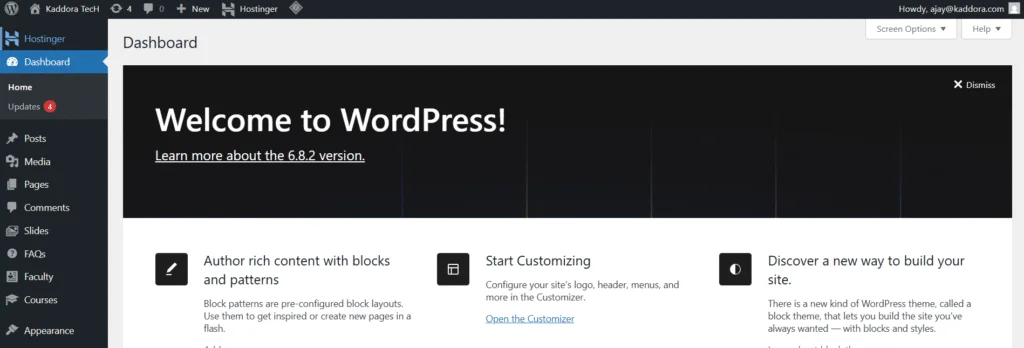
- Plugins → Add New →
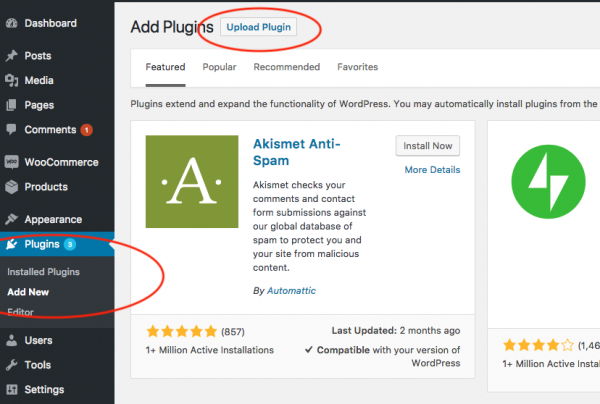
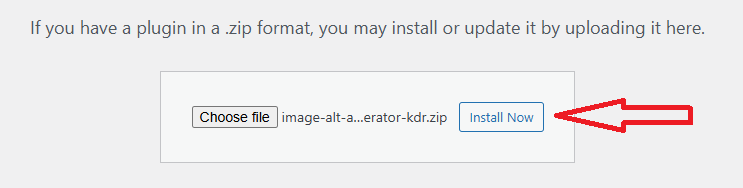
- Upload Plugin > Choose the image-alt-text-auto-generator-kdr.zip plugin file and click Install Now.
- After successfully Installation & Activation of plugin, you will see ‘Image Alt Text Auto Generator KDR’ in your installed plugin section, here you can check version and description about the plugin

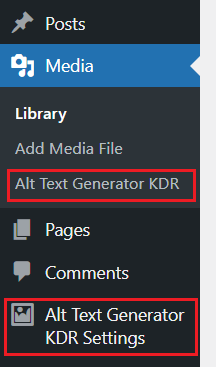
- In WordPress dashboard, you can see ‘Alt Text Generator KDR Settings’ option available, click on it and access the setting part of the Plugin-
4. Settings (Admin Panel) 🛠️
Navigate to: Alt Text Generator KDR Settings page
Available Settings
- Enable auto-generate on upload – Enable auto-generate on upload
Recommended: ON
- Text case – Controls capitalization of generated ALT text.
Options:
| Sentence case : red shoes men → Red shoes men |
| Title Case : red shoes men → Red Shoes Men |
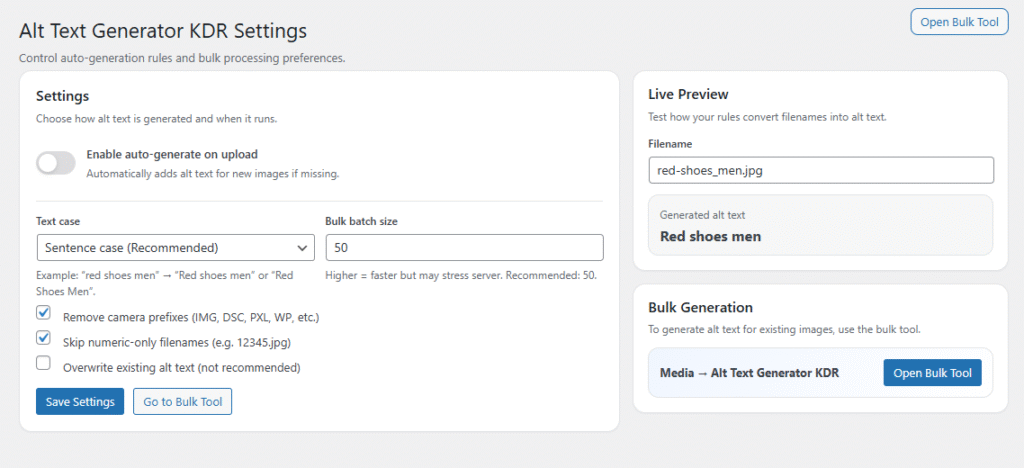
- Bulk batch size – Number of images processed per batch during bulk generation.
Recommended: 50 (Range: 10–200), Higher = faster but more server load.
- Remove camera prefixes – Removes prefixes like: IMG_ , DSC_ , PXL_
- Skip numeric-only filenames – Prevents ALT text from numeric names
- Overwrite existing ALT text – Allows replacing ALT text that already exists.
5. Bulk Alt Text Generator (Media Tool) 📲
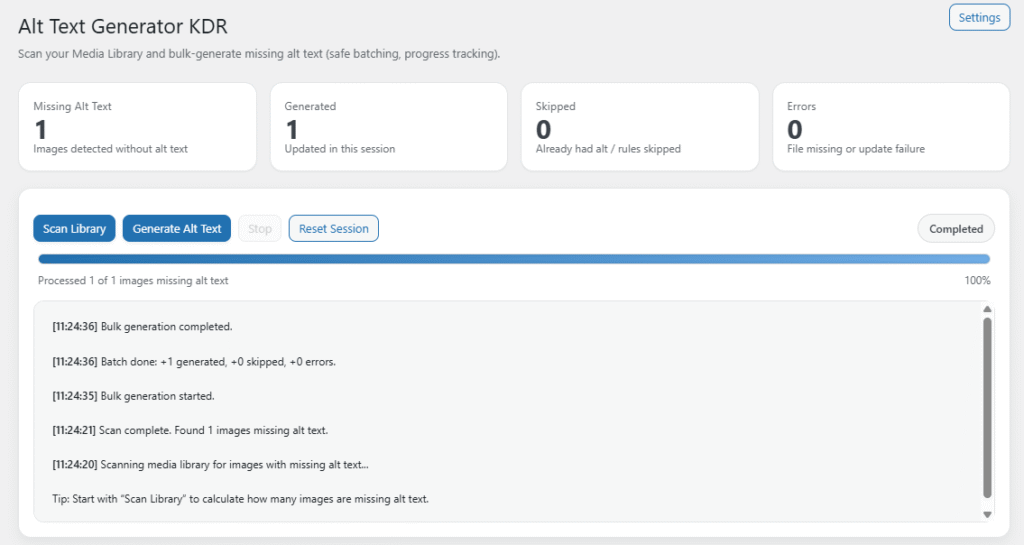
Navigate to: Media → Alt Text Generator KDR (This tool scans and generates ALT text for existing images.)
Interface Overview
- Missing Alt count
- Generated count
- Skipped count
- Errors count
- Progress bar
- Activity log
Steps to Use –
| Step 1 — Scan Library (Counts images missing ALT text.) |
| Step 2 — Generate Alt Text (Processes images in safe batches.) |
| Step 3 — Monitor Progress (Watch live progress and log.) |
| Step 4 — Completed (All missing ALT text generated.) |
6. How It Works (Workflow) 📶
When generating ALT text, plugin:
- Reads image filename
- Removes extension
- Replaces
_and-with spaces - Removes camera prefixes (optional)
- Removes symbols
- Applies case rules
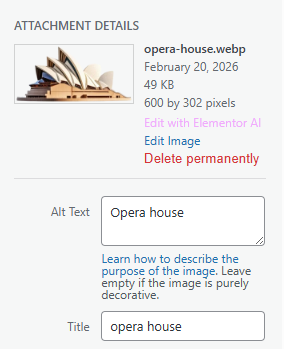
- Saves ALT text
7. Customization Options 🪼
You can customize behavior via Settings:
- Case style
- Prefix removal
- Numeric skipping
- Batch speed
- Auto mode
- Overwrite behavior
8. Shortcodes Guide 🎯
Version 1 does not include shortcodes. All functionality is available via: Media Library and Settings Panel, Future versions may include shortcode support.
9. Performance & Caching ↗️
The plugin is optimized for performance:
- Batch processing prevents timeouts
- No frontend scripts loaded
- No database overhead
- No page render impact
Bulk generation uses:
- AJAX batching
- Offset processing
- Safe memory usage
10. Troubleshooting 🔱
ALT text not generating on upload, Check:
- Enable auto-generate is ON
- Image filename is not numeric only
- ALT field was empty
Bulk stops early, Possible causes:
- Server timeout
- Memory limit
- Plugin conflict
Try:
- Reduce batch size
- Resume generation
Settings not saving, Check:
- User role = Administrator
- No caching plugin blocking admin
- Security plugin not blocking POST
11. FAQ 🌐
Q. Does it overwrite existing ALT text?
A. Only if enabled in settings.
Q. Does it affect SEO?
A. Yes — improves accessibility & image indexing.
Q. Does it slow my site?
No — runs only in admin.
Q. Does it support WooCommerce images?
Yes — all WordPress media images.
12. Support & Updates 🚒
- Contact developer
- Plugin page support
- GitHub issues (if public)
Updates may include:
- AI ALT generation
- Multilingual support
- Rules engine
- Auto caption/title sync
Thank you for connecting Kaddora Tech ❤️