

Kaddora Database Cleanup & Optimization 🎀 : Documentation
user Documentation📜:
Kaddora automatically improves WordPress database performance. Automatically remove unnecessary data, clean post revisions and transients, optimize database tables, and manage database maintenance from one admin dashboard.
📑 Table of Contents
1. Introduction 🎗️
Database Cleanup & Optimization
Kaddora automatically improves WordPress database performance by cleaning unnecessary data and optimizing database tables. It helps reduce database bloat, improve query efficiency, and maintain a healthy database structure for better website performance.
It helps improve:
- Database performance
- Website loading speed
- Query execution efficiency
- Reduced database size
- Overall backend optimization
The plugin works through several optimization features:
- Database cleanup mode — removes unnecessary data such as post revisions, auto-drafts, trashed posts, spam comments, and expired transients to reduce database clutter.
- Database optimization mode — optimizes WordPress database tables to improve performance and maintain efficient data storage.
- Automatic cleanup scheduling mode — allows you to schedule regular database maintenance tasks so your database stays optimized without manual intervention.
- Selective cleanup mode — gives you control to choose exactly which types of data should be cleaned or preserved.
- Kaddora Database Cleanup & Optimization is designed to provide safe and efficient database maintenance without complicated configuration, giving developers and site owners better control over their WordPress database health and performance.
2. Requirements & Compatibility 📌
Minimum Requirements :
- WordPress 5.8 or higher
- PHP 7.4 or higher
- MySQL 5.6+ or MariaDB equivalent
- Administrator access to WordPress dashboard
Tested up to :
- WordPress 6.5
Compatible With :
- Most modern WordPress themes
- Popular caching plugins
- Major hosting environments (shared, VPS, cloud)
- Latest versions of PHP 7.4+ and PHP 8.x
3.plugin installation 📶
Go to the WordPress Dashboard -:
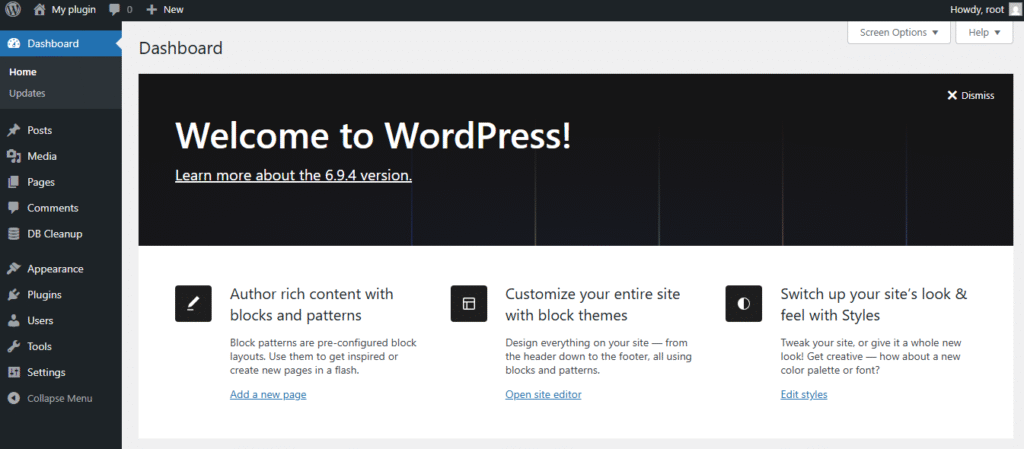
Plugins → Add New →
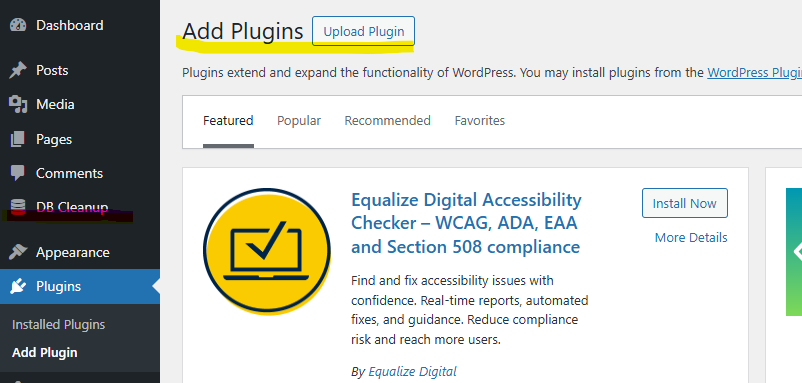
Upload Plugin > Choose the Kaddora-Database-Cleanup & Optimization-plugin.zip plugin file and click Install Now

After successfully Installation & Activation of plugin, you will see ‘Kaddora Database Cleanup & Optimization plugin’ in your installed plugin section, here you can check version and description about the plugin

In WordPress dashboard, you can see ‘ db cleanup plugin’’ option available, click on it and access the setting part of the Plugin.
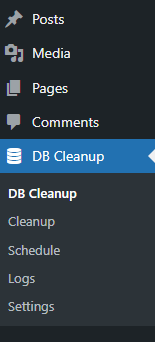
4. Settings (Admin Panel) 🛠️
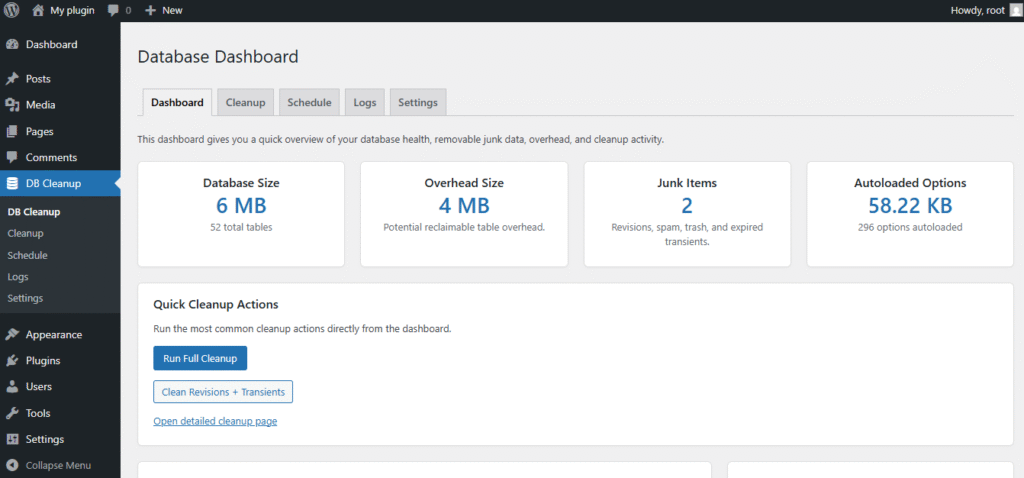
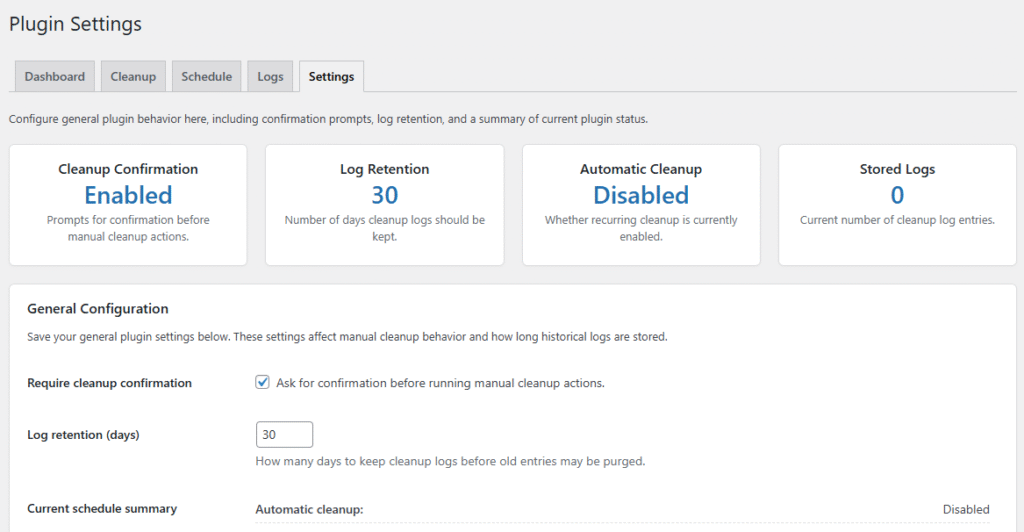
The Kaddora Database Cleanup & Optimization plugin includes a simple and user-friendly settings panel inside the WordPress admin dashboard. From this panel, administrators can manage database cleanup tasks, optimization settings, and automation options without needing technical knowledge.
The settings panel allows you to:
- Enable or disable database cleanup features
- Remove unnecessary data such as post revisions, auto drafts, spam comments, and expired transients
- Optimize database tables to improve performance
- Schedule automatic cleanup tasks (daily, weekly, or monthly)
- Run manual cleanup and optimization with a single click
- Select specific database elements to clean or exclude
All tools are organized in a clean interface so site owners and developers can easily maintain a healthy and optimized WordPress database.
The settings panel is designed to provide safe database maintenance, performance improvements, and full control over database cleanup operations.
h
5.Database Cleanup Features🛠️
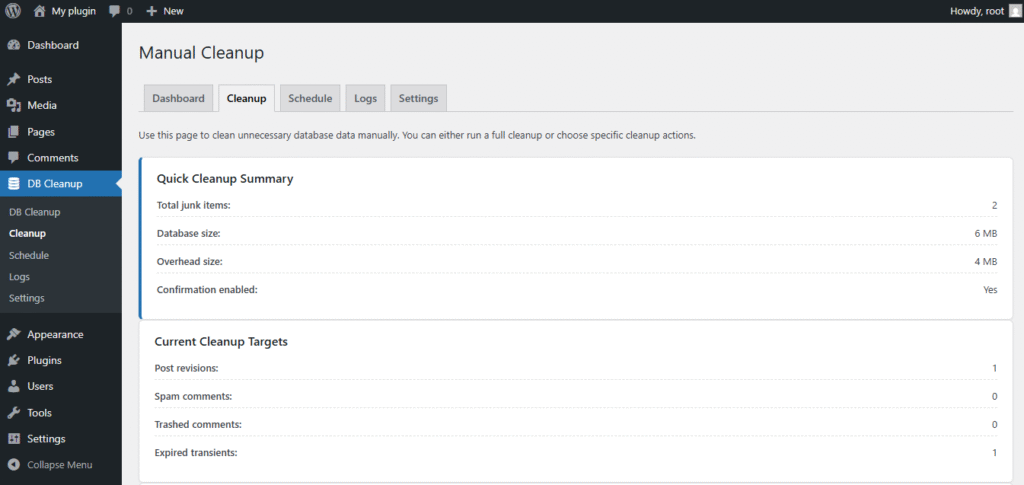
- Auto Draft Removal – Cleans up unused auto-draft posts created during editing.
- Trashed Posts Cleanup – Deletes posts and pages that remain in the trash.
- Spam Comments Removal – Automatically removes spam comments stored in the database.
- Expired Transients Cleanup – Deletes expired transient options to keep the database optimized.
- Unused Metadata Cleanup – Removes unnecessary post meta, comment meta, and other leftover metadata.
- Orphan Data Removal – Cleans orphaned data entries that are no longer linked to existing content.
- Pingbacks & Trackbacks Cleanup – Option to remove old pingbacks and trackbacks.
- Draft Posts Cleanup – Deletes unused draft posts that are no longer needed.
- One-Click Cleanup – Run all selected cleanup tasks instantly from the admin dashboard.
6.Cleanup Scheduling 📶
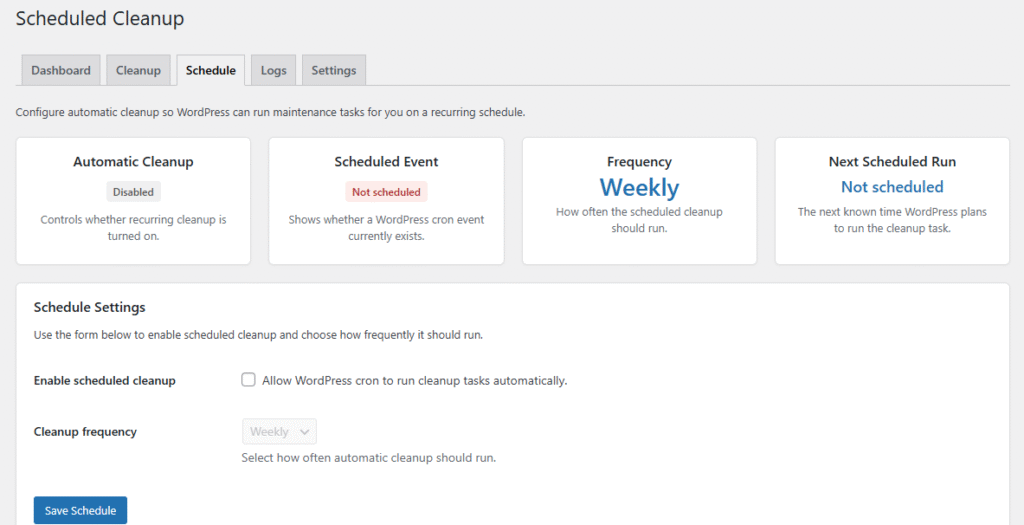
Automatic Cleanup Scheduling – Schedule database cleanup tasks to run automatically without manual intervention.
Flexible Frequency Options – Choose cleanup intervals such as daily, weekly, or monthly.
Selective Cleanup Tasks – Select specific cleanup operations to run during scheduled maintenance.
Background Processing – Scheduled cleanups run in the background without affecting website performance.
Consistent Database Maintenance – Keeps the database clean and optimized regularly.
Time-saving Automation – Reduces the need for manual database management.
Safe Scheduling System – Uses WordPress cron system for reliable and secure automation.
7. Cleanup Logs
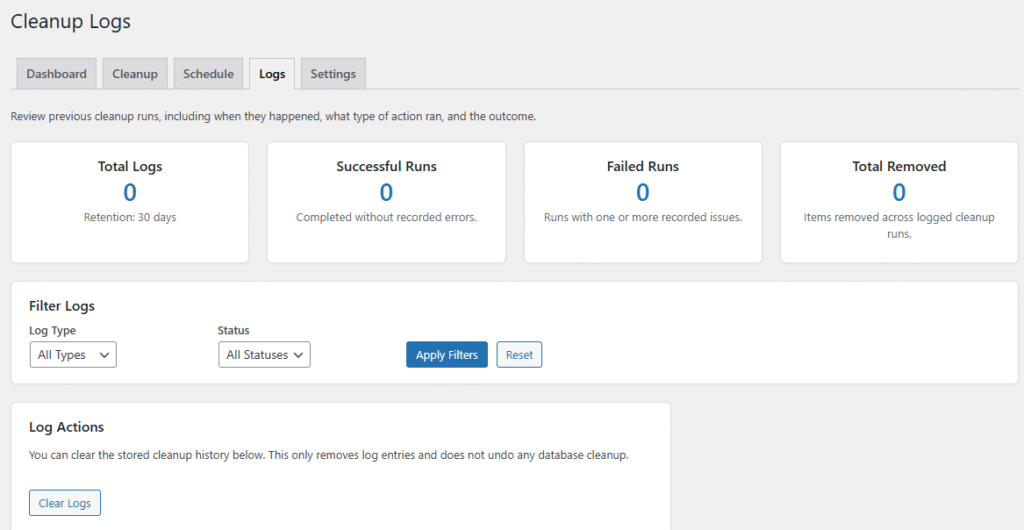
- Detailed Activity Logs – Records all database cleanup actions performed by the plugin.
- Cleanup History Tracking – Displays a history of previous cleanup and optimization tasks.
- Date & Time Records – Shows when each cleanup operation was executed.
- Task Status Information – Indicates whether a cleanup task was completed successfully.
- Data Removal Summary – Provides a summary of the types of data that were cleaned.
- Scheduled Cleanup Records – Tracks cleanup tasks that were executed through automatic scheduling.
- Easy Monitoring – Helps administrators monitor database maintenance activities from the dashboard.
- Troubleshooting Support – Logs help identify issues if a cleanup task fails or does not run as expected.
8.Performance Benefits
Faster Website Loading – A clean and optimized database helps reduce server response time and improves overall page loading speed.
Improved Query Performance – Optimized database tables allow WordPress to retrieve data more efficiently.
Reduced Database Size – Removing unnecessary data such as revisions, spam comments, and expired transients decreases database storage usage.
Better Server Resource Usage – A lighter database reduces the workload on the server and improves stability.
Improved Backend Performance – WordPress admin operations such as editing posts and loading dashboards become faster.
Consistent Database Health – Regular cleanup and optimization help maintain a stable and efficient database structure.
Enhanced Website Reliability – A well-maintained database reduces the risk of performance issues caused by database bloat.
9.Troubleshooting
Asset Not Loading Properly
Check whether the asset path or URL is correct and ensure the file is properly uploaded to the asset management system.
Poor Asset Quality After Optimization
If the optimized asset appears blurry or distorted, adjust the compression level or select a higher-quality optimization setting.
Slow Asset Delivery
Verify CDN configuration, caching settings, and network connectivity to ensure assets are delivered efficiently.
Unsupported File Format
Ensure the asset format is supported by the optimization system. Convert the file into a compatible format if necessary.
Optimization Process Failing
Check system logs or error messages to identify issues such as server errors, storage limitations, or incorrect configurations.
Incorrect Asset Version Displayed
Clear cache or refresh the asset database to ensure the latest optimized version is displayed.
10.FAQ
1. What does Kaddora Database Cleanup & Optimization do?
The plugin cleans unnecessary data from your WordPress database and optimizes database tables to improve performance and reduce database size.
2. Is it safe to clean the database with this plugin?
Yes. The plugin removes only unnecessary or temporary data such as post revisions, spam comments, trashed posts, and expired transients without affecting your website content.
3. Can I choose what data to clean?
Yes. The plugin allows you to select specific cleanup options so you can control which database elements should be removed.
4. Does the plugin support automatic cleanup?
Yes. You can schedule automatic database cleanup tasks to run daily, weekly, or monthly.
5. Will this plugin improve website speed?
Yes. Cleaning and optimizing the database can improve query performance and help your website load faster.
6. Do I need technical knowledge to use this plugin?
No. The plugin is designed with a simple and user-friendly interface so anyone can manage database cleanup easily.
7. Does the plugin delete important website data?
No. It only removes unnecessary or temporary data. Important posts, pages, and settings remain untouched.
8. Can I run cleanup manually?
Yes. You can run database cleanup and optimization anytime from the admin dashboard with a single click.
11.Support & Updates
- Contact developer
- Plugin page support
- GitHub issues (if public)
Updates may include:
- asset optimization
- Multilingual support
- Rules engine
- Auto caption/title sync
Thank you for connecting Kaddora Tech ❤️